Related Blogs

TryNood Guide to At-Home Hair Removal and Skincare
Explore TryNood's at-home hair removal devices, including the Flasher 2.0 and Flasher Pro, alongside shaving tools and body care essentials. Compare features, understand IPL safety, and find practical tips for choosing products that suit your skin and routine.
See More
FindBuyTool Guide to Woodworking Tools and Workshop Equipment
Explore FindBuyTool's woodworking machines, planer accessories, router bits, saw blades, hand tools, and workshop supplies. Compare product features, check machine compatibility, and learn how to choose suitable equipment for your woodworking projects.
See More
How to Choose the Right Laptop
Looking for the right laptop? Find the best device by comparing performance, battery life, and other key feature
See More
TWOPAGES Curtains Review: The Best Custom Drapes for Your Home
Looking for high-quality custom window treatments without the designer price tag? Our expert review covers the top collections from TWOPAGES Curtains, exploring fabric options, durability, and smart sizing tips for your home.
See More
How to Use the Ultimate 3D Printer for Faster Multi Color Printing
The ultimate 3d printer makes multi color printing simple, fast, and more enjoyable for everyday users. This blog helps you understand easy steps and useful tips so you can get better results and smoother prints from the start.
See MoreSnapmaker Artisan Premium 3D Printer Review: Is It Really Worth It in 2026?
All featured products are selected by our editors and may include affiliate links. If you purchase through these links, we may earn a commission.
Creative professionals and small business owners often have great ideas, but finding the right equipment without stretching their budget can be a real challenge. When every project comes with different needs, choosing tools that make sense for the work ahead takes a little thought.
With new technology constantly changing the way people design and create, it’s worth looking closely before investing in something new. The Snapmaker Artisan 3-in-1 3D Printer from Snapmaker is one option worth considering, especially for those looking into the Snapmaker Artisan Premium 3D Printer.
Overview of the Snapmaker Artisan 3-in-1 3D Printer
The Snapmaker Artisan 3-in-1 Premium 3D Printer is designed for people who want to create more than just regular 3D-printed models. Unlike a traditional 3D printer, it brings different types of making together in one machine, giving it a more versatile setup. What makes the printer stand out is the way it combines 3D printing, laser engraving, and CNC carving without needing three separate machines.
Key Features of Snapmaker Artisan 3-in-1 3D Printer
The Snapmaker Artisan 3-in-1 Premium 3D Printer comes with these features to make different creative projects possible.
Dual-Extrusion 3D Printing
The two nozzles let you print with two compatible colors or materials in the same project. This is useful for making prototypes easier to understand or adding removable support to models with tricky shapes. For designers working on detailed parts, it can reduce the effort needed to clean up difficult areas after printing.
40W Laser Engraving and Cutting
The Premium version comes with a 40W laser and air assist, making it suitable for detailed engraving and cutting supported materials. You can use it to create personalized signs, wooden gift boxes, decorative panels, and custom labels for small businesses. Snapmaker lists cutting up to 15 mm basswood plywood in one pass, though results depend on the material and settings.
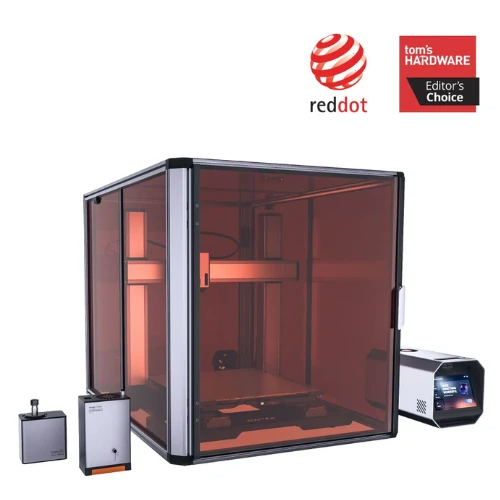
200W CNC Carving Module
The 200W CNC module uses a rotating cutting tool to shape materials such as wood, acrylic, and selected soft metals. It can help you make carved nameplates, wooden relief designs, custom templates, and parts that need more than a flat engraved pattern. This is particularly useful when a project needs a cut shape or textured surface rather than a printed or laser-marked design.
Quick-Swap Modules and Easy Controls
The toolheads and work platforms are designed to swap quickly, so changing the setup for a different job takes less effort. A 7-inch touchscreen and Snapmaker Luban software help you prepare and manage printing, laser, and CNC projects. For a busy workspace, this setup makes it easier to move between different kinds of jobs without learning separate control systems for each task.
Pros and Cons of the Snapmaker Artisan 3-in-1 3D Printer
The Snapmaker Artisan 3-in-1 3D Printer has several practical strengths, though a few things are worth considering before buying.
Pros
- Handles three types of creative work without needing separate machines.
- Dual extrusion makes complex prints and support structures easier to manage.
- Solid construction helps keep the machine stable during different tasks.
- Quick-swap parts make changing between different jobs less of a hassle.
Cons
- Takes up considerable space, so a dedicated work area helps.
- The upfront price may feel high for occasional projects.
- Learning CNC settings can take time for first-time users.
Snapmaker Artisan Premium 3-in-1 3D Printer User Feedback
Using the Snapmaker Artisan 3-in-1 3D Printer can feel like a learning experience, especially for someone trying different projects for the first time. Snapmaker makes the process easier with helpful guides, though getting used to the settings may take a little patience. Once users find their rhythm, switching between projects can feel more natural. It’s a practical choice for people who enjoy making things and learning through hands-on experience.
FAQs
Is the Artisan Premium 3d Printer Suitable for a Small Creative Business?
Yes, the Artisan Premium 3D Printer can suit businesses making custom gifts, prototypes, and personalized products, especially when different types of projects are needed.
How Is the Snapmaker U1 Different from the Artisan?
The Snapmaker U1 focuses on multi-color 3D printing with four independent printheads, while the Artisan also supports laser engraving and CNC carving.
Do I Need a Filament Dryer for Better 3d Printing Results?
A filament dryer can help remove moisture that causes stringing or inconsistent prints, particularly when using moisture-sensitive materials such as TPU and nylon.
Choosing the right 3D printer comes down to your projects, budget, and how much room you have to work. The Snapmaker Artisan Premium 3D Printer is worth considering if you want one machine for different creative tasks and don't mind the learning curve. Snapmaker offers other options too, so it's worth comparing them before making your choice. If it suits your needs, give the Artisan Premium a try.
Stay tuned to GoodsTrial for more information on Snapmaker.
Recent Blogs